
Sign-Up & Verification
Create Your Account
Join millions of users protecting their privacy with OrbVPN. Sign up in seconds using your email or social accounts.
Sign-Up Process
Create your Orb ID in just a few simple steps. Your Orb ID gives you access to all OrbVPN features across all your devices.
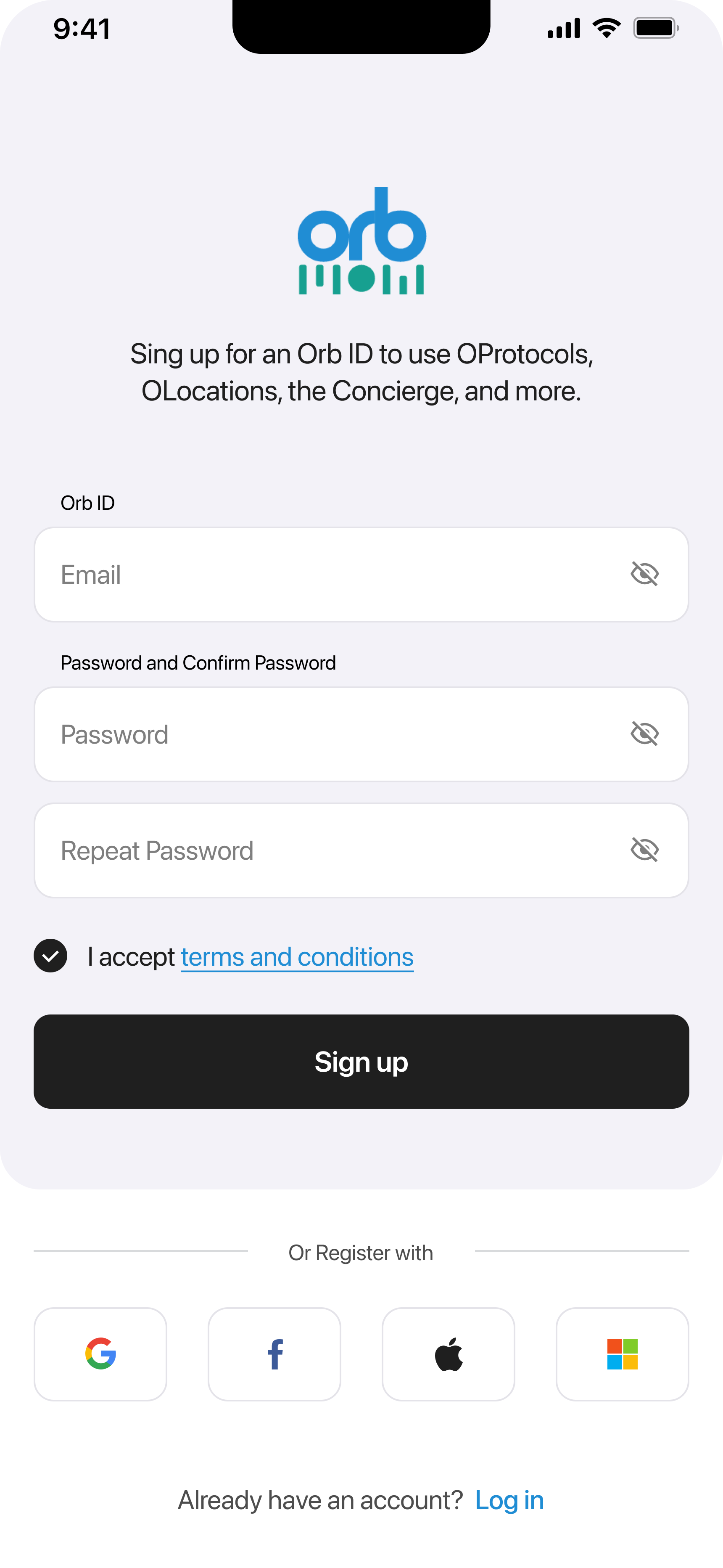
How to Create Your Account
Enter Your Email
Type your email address - this becomes your Orb ID. Make sure it's correct as you'll need it for login and password recovery.
Create a Strong Password
Choose a secure password and confirm it by typing it again. Use a mix of letters, numbers, and symbols for best security.
Accept Terms & Conditions
Review and accept our terms and conditions by checking the box. Tap the link to read the full terms.
Tap Sign Up
Press the Sign Up button to create your account. You'll receive a verification email shortly.
Quick Sign-Up Options
Skip the form and sign up instantly with your existing accounts:
One-tap sign up with Google
Use your Facebook account
Apple
Sign up with Apple ID
Microsoft
Use your Microsoft account
Email Verification
After signing up, you'll need to verify your email address to activate your account.

Verification Steps
Check Your Email
Open your email inbox and look for a message from OrbVPN containing your 4-digit verification code.
Enter the Code
Type the 4-digit code into the verification boxes on the screen. Each box holds one digit.
Tap Verify
Press the Verify button to confirm your email address and activate your account.
Didn't Receive the Code?
Check your spam or junk folder first. If you still don't see it, tap "Resend Code" to get a new verification email. You can also tap "Change Email" if you entered the wrong address.
Troubleshooting
Password Issues
Ensure passwords match and meet security requirements: 8+ characters with letters and numbers.
Email Problems
Check spam folder, verify correct email address, and ensure your inbox isn't full.
Code Not Working
Codes expire after 10 minutes. Request a new one if yours has expired.
Social Sign-Up Failed
Verify your social account works by logging into that service directly first.
Ready to Get Protected?
Complete your sign-up and start browsing securely in minutes. Your privacy journey begins now.