
Device Management
Manage Your Devices
Keep track of all devices connected to your OrbVPN account. View active sessions, disconnect devices remotely, and control access across all your devices.
Devices Overview
The Devices screen gives you complete visibility and control over all devices using your OrbVPN account. Monitor both app logins and VPN connections in one place.
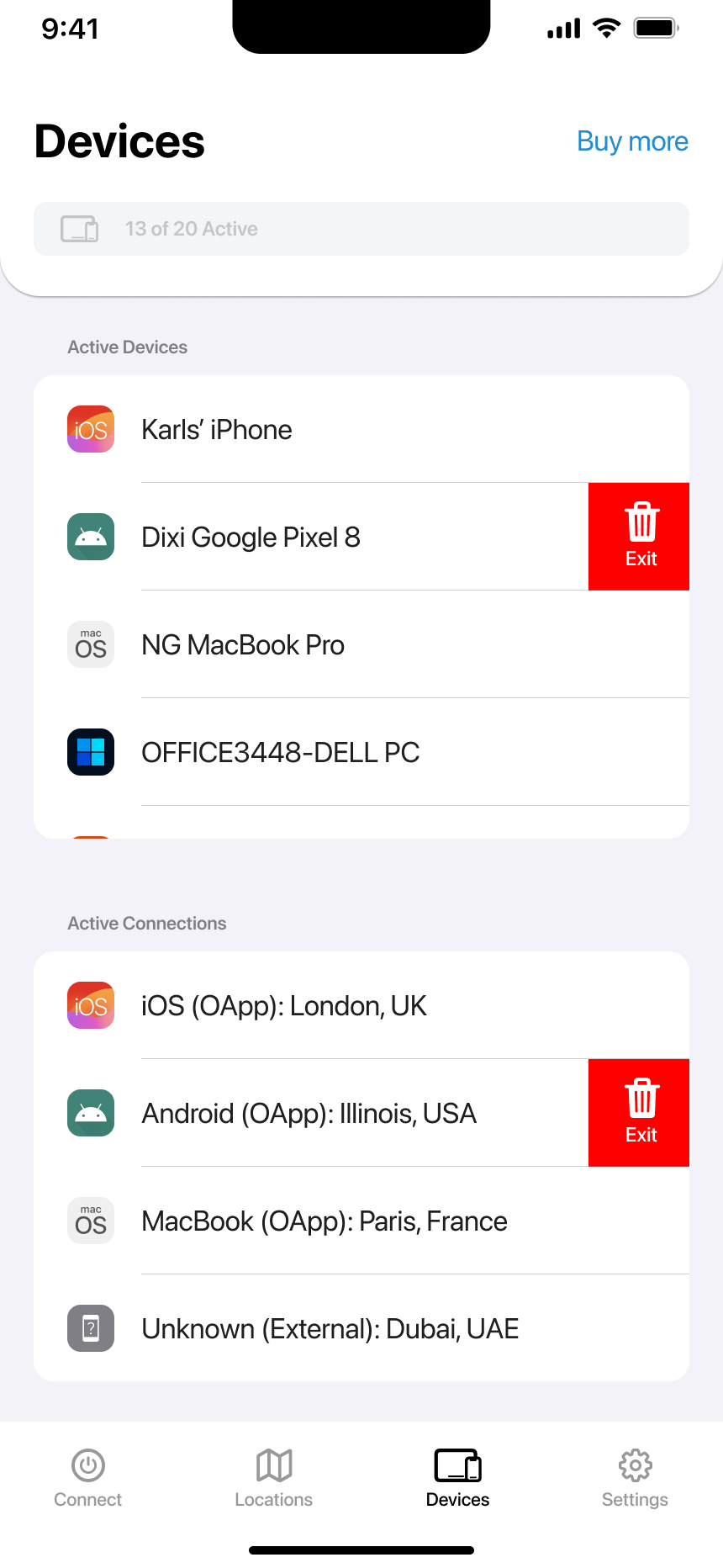
Device Types
Active Devices
Devices where the OrbVPN app is currently logged in. Shows device name, type, and operating system.
Connected Devices
Devices actively connected to VPN, whether through OrbVPN app or third-party clients. Shows location info.
Managing Your Devices
View Active Devices
Scroll through the Active Devices list to see all devices where OrbVPN is logged in. Each entry shows the device name and OS icon.
Check Connected Devices
Review the Connected Devices section to see which devices are actively using the VPN and their connected locations.
Logout or Disconnect
Swipe left on any device to reveal the Exit button. Tap it to log out the app or disconnect the VPN session.
Add More Devices
Need more slots? Tap 'Buy more' to increase your device limit and protect more devices simultaneously.
Remote Device Control
Take action on any device from anywhere. Perfect for managing family devices or securing your account if a device is lost.
Remote Logout
Log out the OrbVPN app from any device remotely. The user will need to sign in again.
Disconnect VPN
End active VPN sessions on any device. Useful when you need to free up a device slot.
Security Tip
If you suspect unauthorized access, immediately log out all devices and change your password in the Security settings.
Need More Devices?
Your subscription plan determines how many devices you can use simultaneously:
Basic Plan
1 device included. Perfect for protecting your primary device.
Premium Plan
5 devices included. Ideal for personal use across multiple devices.
Family Plan
25 devices included. Protect your entire household.
Upgrade Anytime
Tap "Buy more" on the Devices screen to add extra device slots or upgrade to a plan with more devices included.
Troubleshooting
Device Not Showing
Refresh the screen or check if the device is online and running OrbVPN or a third-party VPN client.
Cannot Logout
Ensure stable internet connection. Restart the app if the Exit button doesn't respond.
Device Limit Reached
Use 'Buy more' to add slots, or log out unused devices to free up space for new ones.
Wrong Device Name
Device names are pulled from device settings. Change the name on the device itself to update.
Protect All Your Devices
With OrbVPN, one account protects multiple devices. Keep your phone, tablet, laptop, and more secure with seamless multi-device support.