
Location Management
Choose Your Location
Connect to servers worldwide with a single tap. Browse the internet as if you're in any country, access geo-restricted content, and find the fastest servers.
Locations Screen
Browse and select from our global network of servers. Find the perfect location based on your needs - whether it's speed, privacy, or accessing specific content.
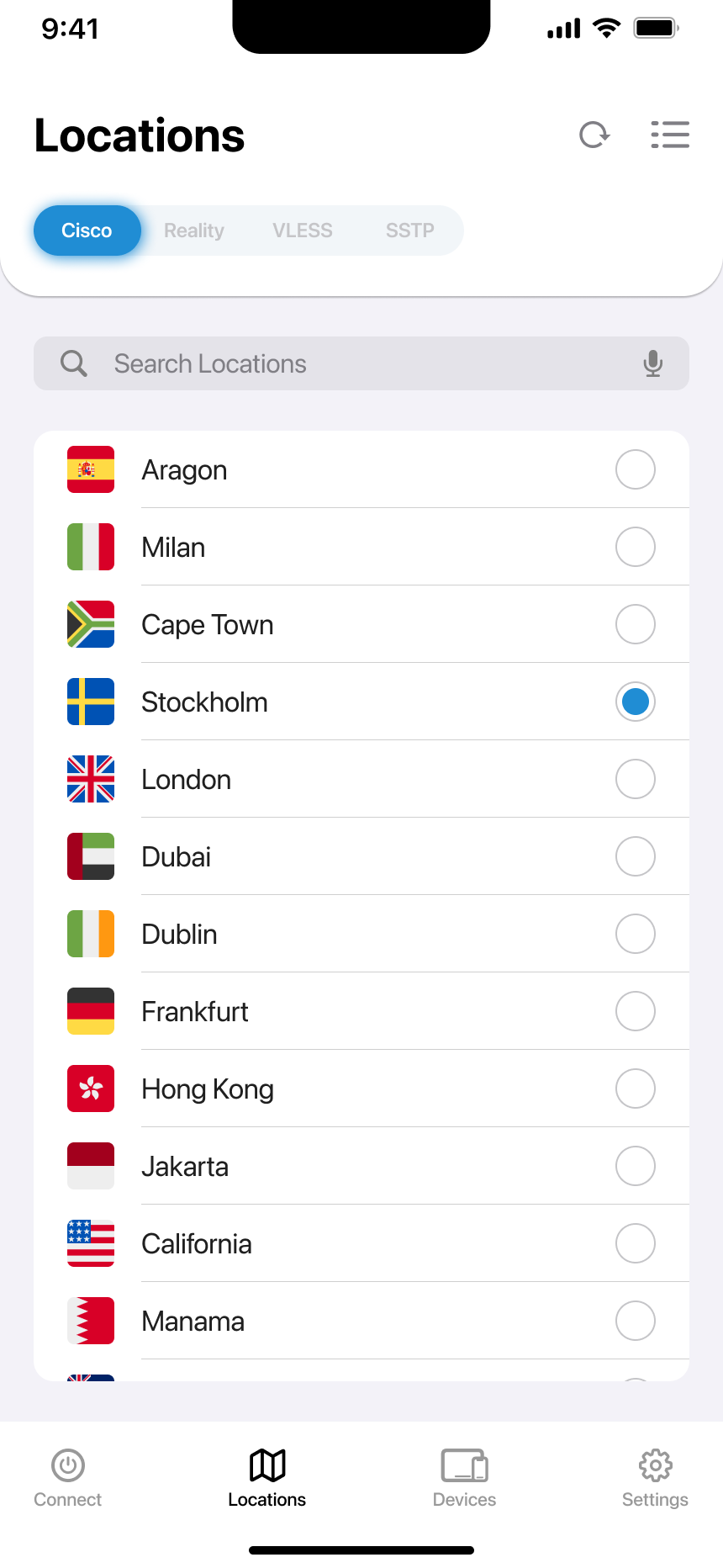
Screen Features
Protocol Tabs
Switch between Cisco, Reality, VLESS, and SSTP protocols to see available servers for each.
Quick Search
Type to instantly filter and find specific cities or countries in the server list.
Refresh Servers
Tap the refresh icon to get the latest server list with new locations and updated status.
Smart Sorting
Organize servers by alphabet, continent, congestion, or crypto-friendliness.
How to Select a Location
Choose Your Protocol
Tap on Cisco, Reality, VLESS, or SSTP tabs at the top to filter servers by your preferred VPN protocol.
Search or Browse
Use the search box to find specific locations quickly, or scroll through the list to explore all options.
Select Your Server
Tap on any location to select it. A filled circle indicates your selection is active.
Connect
Navigate to the Connect tab and tap the power button to connect to your selected server.
Pro Tip: Refresh Regularly
Tap the refresh button (↻) regularly to see newly added servers and get updated congestion information for optimal performance.
Sorting Options
Organize the server list to find exactly what you need. Access sorting by tapping the sorting icon (≡) in the top right corner.

Available Sorting Methods
Alphabetical Order
Sort all locations from A to Z for easy browsing and finding specific countries or cities.
Continental
Group servers by continent - perfect when you need a server in a specific region of the world.
Congestion
Sort by server load to find the least crowded servers for maximum speed and performance.
Crypto Friendly
Filter for locations that support cryptocurrency activities and privacy-focused browsing.
How to Apply Sorting
Open Sorting
Tap the sorting icon (≡) in the top right corner of the Locations screen.
Choose Method
Select your preferred sorting option: Alphabetical, Continental, Congestion, or Crypto Friendly.
Save Selection
Tap 'Save' to apply your sorting preference and return to the organized location list.
Sorting Persists
Your sorting preference is saved and will be applied each time you open the Locations screen until you change it.
Troubleshooting
Locations Not Loading
Check your internet connection and tap the refresh button. Restart the app if the issue persists.
Slow Server List
Large server lists may take a moment to load. Use search to find specific locations faster.
Missing Locations
Some servers may be temporarily unavailable. Refresh the list or try again later.
Sorting Not Working
Make sure to tap 'Save' after selecting your sorting preference to apply the changes.
Explore Our Global Network
With servers in 50+ countries, you'll always find the perfect connection for your needs. Fast, secure, and reliable.